Posts

What’s New in Microsoft Teams June 2020 Edition

Image
Microsoft Teams continues to evolve to be the hub for teamwork and Microsoft recently launched new functionality that helps people do their best work. Large Gallery View Large gallery view expands the Teams grid view to 7×7, which will accommodate up to 49 participants at once on a single screen. This would be Generally Available soon. The initial roll out is planned for the Educational Tenants to enhance the Experience of engagement between the Teaches and the Students Large Gallery View User Voice. Virtual Breakout Rooms Breakout Rooms allow meeting organizers to split their Teams meeting participants into small groups to assist ideation, brainstorming, learning, and discussions. Breakout Rooms will be delivered later this calendar year.  Virtual Breakout Rooms User Voice Multi-Window for Meetings & Calling Multi-window experiences are coming to Teams meetings and calling. You will have the ability to pop out meetings and calli...

Cisco Unified Border Element (CUBE) Router Certified for Microsoft Teams Direct Routing for Non-Media Bypass Architecture

Image
As announced in the Microsoft Ignite 2019 finally the big news in the unified communication world is here, Cisco’s Session Border Controllers, the Cisco Unified Border Element (CUBE) are now certified for Microsoft Teams Direct Routing. This means majorly all the Cisco Customers can use the existing Cisco Cube Routers for Microsoft Teams Direct Routing Services. The current certified solution is majorly for Non-Media Bypass architecture. The following products running IOS XE Amsterdam 17.2.1r have been certified: Cisco Unified Border Element (CUBE) for 1000 Series Integrated Services Routers Cisco Unified Border Element (CUBE) for 4000 Series Integrated Services Routers Cisco Unified Border Element (CUBE) for 1000V Series Cloud Services Router Cisco Unified Border Element (CUBE) for 1000 Series Aggregation Services Routers Office List of the Microsoft Teams Certified SBC has been updated as well with the Cisco SBC Information List of the ...

Microsoft Teams New Meeting Lobby Enhancement

Image
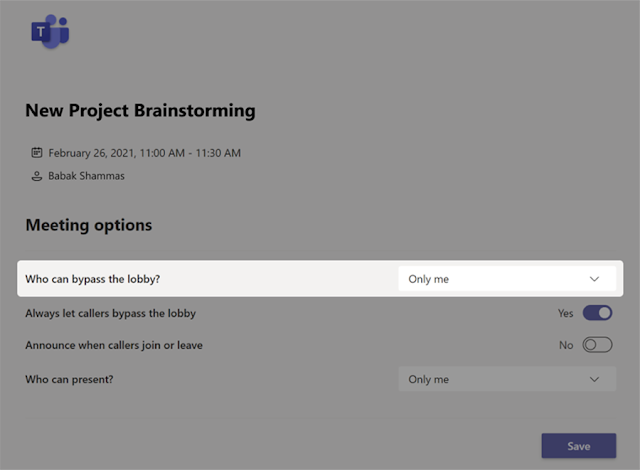
To ensure the best possible experience for our users, we are delaying some of our deployments to reduce the amount of change flowing into the services. Please see the updated roll-out timeline below We are providing Teams meeting organizers greater control over their meetings by making it possible to require all participants to wait in the lobby. Microsoft 365  Roadmap ID 64643 for the below Feature Release. How this will affect your organization After scheduling a new meeting, the organizer will be able to configure meeting options so that only the organizer can bypass the lobby. After changing the meeting option to Only me, the meeting organizer can manage who is allowed into the meeting. How this is Useful for the Enterprise Users and the Educational Organizations After the above feature is enabled all the guest users as well as the users within the organization will have to wait in the Lobby to start the meeting until the org...

Microsoft Build Cloud Skills Challenge 2020: Free Certification Exam

Image
Most of us have been a part of the Microsoft Build 2020 and participated in the Exciting Microsoft Build Cloud Skill Challenge. Below are the Steps to check and book the Free Certification Exam which was a part of the Microsoft Offering for every participant. Steps to Claim the Free Exam Voucher are as follows: - Step 1 Navigate to the Microsoft Certification which you want to Attempt and Click on Schedule the Exam Step 2 You will be prompted to Login to the Microsoft Account as per the Below Screenshot. Kindly use the personal account for proceeding with the Certification so that you have an access to it Step 3 Fill in all the details as requested Step 4 Verify the Drop Down as per the Below Screenshot & Select Microsoft Build Cloud Skills Challenge Step 5 Select the Account which was used for Microsoft Build 2020 Registration Step 6 In case you are Eligible you will receive the followin...

Microsoft Azure Free Exam Vouchers

Microsoft has been offering free training online for the AZ-900 exam. There have been many sessions, and as they get full, new ones are being added. Here is the Microsoft website that lists them through August, September & October:  https://azure.microsoft.com/en-us/community/events/?query=fundamentals https://www.microsoft.com/en-us/trainingdays   These are two half-day sessions. And at the end, you receive a free voucher to take Any Azure exam. Generally, the Microsoft send the Vouchers in a weeks’ time. In case you do not receive the voucher you can reach out to techsfb@microsoft.com to get the vouchers So, if you have been studying for AZ-103, AZ-104, AZ-300, AZ-301, AZ-303, AZ-304 or AZ-203 and have not booked it yet, perhaps this can help. You can attend two days of official Microsoft training on the basics, and then take the exam you want for free.

MS-700 Microsoft Teams Preparation Guide

Image
Microsoft Exam  MS-700: Managing Microsoft Teams  provides you the Microsoft 365 Certified: Teams Administrator Associate certification Skills Measured           •   Plan and Configure a Microsoft Teams Environment (45%-50%)           •   Manage Chat, Calling, and Meetings (30%-35%)           •   Manage Teams and App Policies (20%-25%) Microsoft Teams is constantly changing as a Product be sure we are updated with the latest blog on Microsoft Teams Blog Here Plan and Configure a Microsoft Teams Environment (45-50%) Plan and configure network settings for Microsoft Teams Implement Governance and Life cycle Management for Microsoft Teams Configure and manage guest access Manage security and compliance Deploy and manage Microsoft Teams endpoint Monitor and analyze service usage 1.     Plan and Configure Network Setting fo...