Posts

Showing posts with the label Teams Meeting

Road Map Features for Microsoft Teams Meeting

Image
  Microsoft has announced multiple road-map features for Teams Meeting enhancing the Teams Meeting experience for the Meeting organizer and the End Users. Below is the list of features with their Roadmap feature Id: - ·           Microsoft Teams Break Out Creation Pre-Meeting and Assignment of the participants prior to the start of meeting.   ·           Microsoft Teams Break Out Room Presenter Support ·           Separate Window Teams Live Events Producer Experience ·           Co-organizer Roll for Microsoft Teams Meeting   ·         Lock Microsoft Teams Meeting for additional joins. ·         Present from Microsoft PowerPoint to Microsoft Teams Meeting Reference: - Microsoft Road Map Features ...
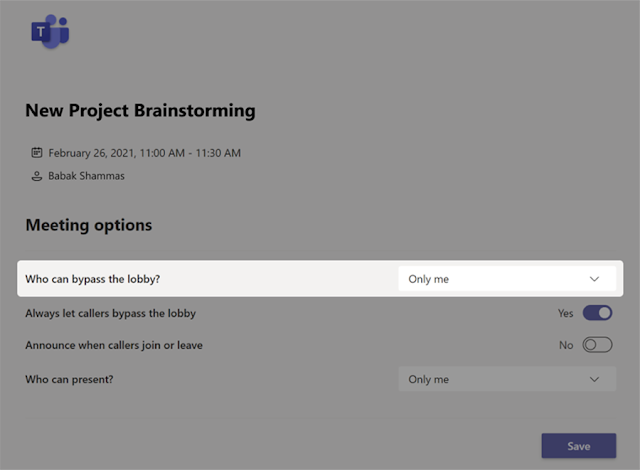
Microsoft Teams New Meeting Lobby Enhancement

Image
To ensure the best possible experience for our users, we are delaying some of our deployments to reduce the amount of change flowing into the services. Please see the updated roll-out timeline below We are providing Teams meeting organizers greater control over their meetings by making it possible to require all participants to wait in the lobby. Microsoft 365  Roadmap ID 64643 for the below Feature Release. How this will affect your organization After scheduling a new meeting, the organizer will be able to configure meeting options so that only the organizer can bypass the lobby. After changing the meeting option to Only me, the meeting organizer can manage who is allowed into the meeting. How this is Useful for the Enterprise Users and the Educational Organizations After the above feature is enabled all the guest users as well as the users within the organization will have to wait in the Lobby to start the meeting until the org...

Microsoft Teams Custom Video Background

Image
Most of the Organization who are using Microsoft Teams have received the latest application wherein they are able to customize the background images on the Microsoft Teams Application while displaying the Video. Background effects feature for Teams meetings is part of road map ID 62890. Microsoft has rolled out for all the Tenant and for the Tenants who have not received it yet the feature will be rolled out till the End of April 2020. How to Enable the Video with the Background Image with Microsoft Teams Meeting Form the Microsoft Teams Application > Start a Meet Now Meeting and Then Click on More Options Then select the appropriate image and do the preview as well Refer to the below image.  Once you click on Apply and Turn on the Video the settings would be saved and the specific custom background can be used for the Video in the Teams Meeting Currently with the custom background for the Video you can upload your favorite back...

New Feature Launched in Microsoft Teams End Meeting & Multiple Chat Feature

Image
Microsoft Teams Application has always been improving based on the feature’s availability in the Teams Application. Microsoft has been enhancing the features some based on the existing Skype for Business Application and some based on the User Voice Request. New Features Released in the April Update of Microsoft Teams Application There were requests wherein the Microsoft Teams Meeting used to continue even after all the participants have left the meeting. One of the primary features available in Skype for Business Application was missing in Microsoft Teams Application of End Meeting With the latest Microsoft Teams Application Released in April with the version 1.3.00.8663 Microsoft has released the End Meeting in Microsoft Teams Application. Here is the below snapshot of the Feature Availability.   The Feature released is available with both the Meet-Now Meetings and with the schedule Microsoft Teams Meeting New Features Rolling in the April – May Upda...