Posts

Showing posts with the label Microsoft Teams

Delegate Features in Microsoft Teams Get a Major Overhaul, Including Call Barging
Image
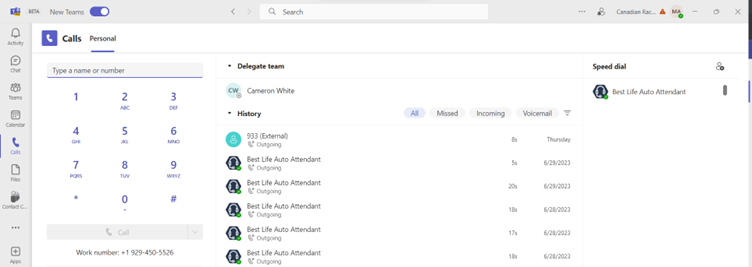
Microsoft Teams has added new features for Delegate. One of the key features added recently is Call Barge. Is this the start of the Contact Centre Development within Microsoft? Let’s see what the major changes are introduce to the Microsoft Teams Voice Delegate.        1.   Firstly, Microsoft introduce a separate Call Logs for the Delegates and Delegator. All the Person Calls              will be in a separate Call History and Delegate Call History will be separate.  Delegate’s Personal Call History Delegator’s Call History 2.      In case the users are using New Teams Client the Delegation Feature is in Call Tabs. It is still under the General Tab in the Old Teams Client 3.      Earlier we only had three configurations while Delegating the Access. Now we have Five configuration which includes the configuration f...
Image
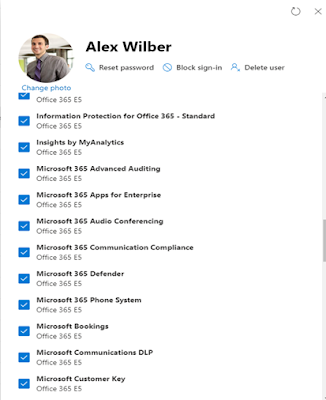
  All about Microsoft Teams Audio Conferencing Microsoft Teams Audio Conferencing Services is available in 90 countries wherein they can support dial-in and dial-out capabilities from the Microsoft Teams Meeting. Availability of Microsoft Teams Audio Conferencing Microsoft Teams Audio Conferencing License are free by default with Office 365 E5, Microsoft 365 E1/E3/E5, Microsoft 365 G1/G3/G5 and Microsoft 365 A1/A3/A5 licenses. But this Audio Conferencing licenses, and the services needs to be configured for E1/A1/G1 and E3/A3/G3 SKU customers. Pay as you Go is ideal for users who need to make occasional conference calls without committing to a monthly subscription. Users can purchase prepaid minutes that they can use for conference calls. The cost per minute depends on the country of the user and the location of the conference call. Earlier in Microsoft Teams Meeting Invite we had challenges with having multiple DID in the Invites. Microsoft have released the customization...

Microsoft Teams Room Announcement at Ignite 2022

Microsoft made many announcements around the Microsoft Teams Rooms at the Ignite event. Let’s discuss all important ones 1.      Hotdesking capability for the Teams Display Devices . Now Teams display devices from Microsoft, Poly, Yealink, Crestron will soon support the Host Desking capabilities. This would enable the users reserving the desk and having all the features like Making a PSTN Calls, Joining the Teams Meeting, having chat with users within from the same device. 2.      Smart Camera and Presenter Device: - OEMs like Logitech enabled their dock devices to disable camera capability from the device adding a value to the users. Additionally, Microsoft announced Microsoft Presenter Plus allowing the users to navigate the presentations using the device. It also allows the presenter to raise the hand capability using the dedicated Microsoft Teams button. 3.      More Inclusive Experience for everyone with Teams Rooms...

Microsoft Teams Phone Announcement at Ignite 2022

  Microsoft Ignite was brisk this time spanning over two days with tons of new announcements across all the different services in Microsoft 365. Let’s look at the key announcement made for Teams Telephony General Availability of Microsoft Teams Phone Mobile Yes, you heard it correct Operator Connect Mobile have now been rebranded as Microsoft Teams Phone Mobile. It is generally available in Canada and Sweden with more partners on-boarding the services different countries around the world. Detailed Call History Providing the enhanced reporting and Call Path information for each individual calls coming into the Microsoft Teams platform. Federated Group Calling One of the most requested features in Microsoft Teams was federated Group Calling in Microsoft Teams. Now Teams users soon would be able to make group federated group calling with external domains. Call Queue and Auto Attendant Reports Similar like the regular analytics reports Call Queue and Auto Attendants reports...

Cisco Unified Border Element CUBE Router Certified for Microsoft Teams Direct Routing Architecture

Image
After Cloud Video Interop Services with Microsoft this was the Next Thing most of the customers were eagerly waiting. Cisco Cube is now supporting both the Media Bypass & Media Flow Through Capability.  Earlier last year Cisco and Microsoft announced support of Cisco Cube with Non-Media Bypass for the Microsoft Teams Direct Routing. Now Cisco Cube is supporting the Media By-Pass architecture which means this can be used in regulated countries like India, China, and the Middle East. Microsoft & Cisco worked closely to release the Media-Bypass capability for Cisco Cube Routers. Now Cisco Customers can use the existing Cisco Cube Routers for Microsoft Teams Direct Routing Services. The following products running IOS XE Amsterdam 17.3.2 recommended have been certified: Cisco Unified Border Element (CUBE) for 1000 Series Integrated Services Routers Cisco Unified Border Element (CUBE) for 4000 Series Integrated Services Routers Cisco Unified Border Elem...

New Feature Released in Microsoft Teams - Next Level Experience

Image
What’s Next in the Latest Updates for Microsoft Teams Services. With the current pandemic the feeling of togetherness and working in isolation has been a daily task. With the latest announcement made by Microsoft with the Enhance Meeting Experience here is the list of all the important features announce. 1.         Together mode Together works seamless into the Microsoft Teams Meeting. It works only when you have at least 5 participants in the Teams Meeting. This can scale up to 49 people at the same time. 2.         Dynamic View Dynamic layout and sizing of different videos feeds to maximize screen use and optimize the layout for those on video. In case the Teams Meeting is Audio Only Meeting then most Active Speaker mode will be enabled. In case the meeting has any one of the participants on the Video the video feed would be will be prioritized accordingly. 3.    ...

What’s New in Microsoft Teams June 2020 Edition

Image
Microsoft Teams continues to evolve to be the hub for teamwork and Microsoft recently launched new functionality that helps people do their best work. Large Gallery View Large gallery view expands the Teams grid view to 7×7, which will accommodate up to 49 participants at once on a single screen. This would be Generally Available soon. The initial roll out is planned for the Educational Tenants to enhance the Experience of engagement between the Teaches and the Students Large Gallery View User Voice. Virtual Breakout Rooms Breakout Rooms allow meeting organizers to split their Teams meeting participants into small groups to assist ideation, brainstorming, learning, and discussions. Breakout Rooms will be delivered later this calendar year.  Virtual Breakout Rooms User Voice Multi-Window for Meetings & Calling Multi-window experiences are coming to Teams meetings and calling. You will have the ability to pop out meetings and calli...